
We built a private AI server in our lab and ran realistic test workloads on it for seven weeks. This post covers why we went local, what ran on the server, what that choice cost, and how to set up the same base server yourself.
Where this fits · Running Local AI in Production · Part 1 of 11
You are reading Part 1 of 11 in a series where we built a private AI server in our lab and ran realistic test workloads on it for seven weeks. Each part stands on its own. This one covers why we built the lab on our own hardware, what ran on it and what that choice cost.
Series guide · Part 2: How Do You Control Access to Local AI Models? Use a Gateway →
Just want it working? Follow the step-by-step setup guide: local AI with Ollama and LiteLLM, from a bare server to a secure gateway.
See all 11 parts of the series
- Local AI or Cloud AI? Why We Built a Private AI Server (you are here): why we built the lab on our own hardware, what ran on it and what that choice cost
- How Do You Control Access to Local AI Models? Use a Gateway: one LLM gateway as the only way to reach a model: keys, budgets and tracing
- Why Does a Local AI Server Freeze? Sizing Memory for LLMs: five hard freezes and the memory budget that ended them
- What Happens When a Prompt Is Too Big for a Local LLM?: fitting every prompt to a local model’s context window
- How Do You Run Several AI Models on One GPU Without Slowdowns?: routing requests across models on a single GPU without constant model swaps
- How Do You Keep an AI Server Stable? GitOps for Local AI: running the server from a Git repository: deploys, drift, pinning and safe AI agents
- What Is Your Local AI Server Actually Doing? Observability Basics: making the server observable: traces, dashboards, usage and heat
- Can Local AI Agents Analyse Stocks? How We Tested and Scored Them: a multi-agent stock-analysis experiment and how we scored the agents
- Why Was Our Telegram AI Agent So Slow? The Hidden Prompt Cost: a Telegram AI agent on local models, and why its fixed prompt became the budget
- Can AI Automate Business Workflows Without Sending Data Out?: document, email and knowledge-base workflows that keep data on the server
- Is Private AI Worth It? Lessons From Seven Weeks in Our Lab: the lessons from seven weeks, the honest limits and what comes next
This series documents a private AI server we built and stress-tested in our lab. Workloads and data are synthetic or generalised; the problems, measurements and fixes are real.
TL;DR
- Local or cloud? For sensitive, everyday work we chose local: data stays on hardware you own, the cost is fixed and you decide when anything changes. The cloud still fits public, non-sensitive work.
- The problem: cloud AI means sending your data to someone else, paying per token and accepting their changes. We wanted to know whether a small team could run its everyday AI on its own hardware instead.
- Our approach: one NVIDIA DGX Spark in our lab, seven weeks of realistic test workloads, and one rule in place of a data classifier: data never leaves the server.
- The result: it works, with two models resident in 37.8 GB and every call going through one gateway. The price is that you become the operator, and the lab server froze hard several times before we got there.
- The lesson: design around the memory you measure, not the model card, and turn every problem into a written rule that a check enforces.
Jargon buster: 15 terms used in this post, explained in plain English
- Local LLM / local AI: An AI model that runs on your own hardware instead of a cloud service, so prompts and data stay on your server.
- Model (weights): The trained numbers that make up an AI model. Loading a model means copying its weights into memory.
- Token: The small chunks of text a model reads and writes, roughly three-quarters of an English word each. Limits and costs are counted in tokens.
- Prompt: Everything sent to a model in one request: the instructions, the conversation so far and any documents.
- KV cache: Working memory a model keeps while it reads a prompt. It grows with the length of the context, so long contexts need a lot of memory.
- Unified memory: A design where the CPU and GPU share one pool of memory instead of the GPU having its own. Flexible, but both compete for the same space.
- GPU: Graphics processing unit: the chip that does the heavy maths for running AI models quickly.
- Slot (parallel requests): One request a model server can work on at the same time. More slots serve more people at once but reserve more memory.
- Ollama: Free, open-source software that downloads and runs AI models on your own machine and answers requests over a local API.
- LLM gateway: A single service every AI request must pass through, so access, budgets and logging are controlled in one place.
- Workflow: A sequence of automated steps, for example: read an email, extract the details, draft a reply for a person to check.
- OCR: Optical character recognition: turning scanned documents or images of text into machine-readable text.
- AI agent: An AI model given tools (such as search, files or other programs) and allowed to take several steps on its own to complete a task.
- Docker / container: A way of packaging an application with everything it needs so it runs the same anywhere; each packaged application runs in its own container.
- systemd: The service manager on most Linux systems: it starts, stops and supervises background services.
The problem: AI is useful, but the cloud has a price
Most businesses that try AI start with a cloud service, and that means three things. Your data leaves your control: requests, replies, inbound email, invoices and screenshots of error messages all go to someone else’s servers. You pay per token, so the bill grows with every workflow you add. And the provider decides when a model changes or disappears.
For a business with sensitive data, the first point alone can rule AI out. We wanted to know whether there was a practical alternative: could a small team run useful AI on its own hardware, with nothing sent to a cloud service? Data sheets couldn’t answer that, so we built one.
What we were aiming for
We set four goals for the lab build:
- data never leaves the server, enforced by the machine rather than by good intentions;
- a predictable cost, with no per-call bill;
- realistic work on one machine: workflows, document OCR, a chat assistant, coding tools and a multi-agent experiment;
- run it like production, so every change is safe, traceable and reversible.
How we approached it
All test data was synthetic or public: sample document requests, public reference datasets, test invoices and sample PDFs, a synthetic mailbox, and a demo knowledge base built from open-source project documentation. We treated it as though it were real, because that is the point of the exercise, and ran the server under that load for seven weeks.
Our first design was a hybrid. A cloud model would be "the brain" and plan complex work, while local models would be "the hands" for bulk and sensitive processing. A three-tier sensitivity policy would keep personal data, credentials and confidential documents local, with a PII scanner and a keyword classifier inspecting every request.
We dropped the classifier, because a classifier has to be right about every single request. Instead we wrote one sentence into the lab’s operating rules:
Data never leaves the box; only the stock-analysis experiment may use a cloud model, and only a free one, on public market data.
A rule about where requests may go is easier to enforce than a judgement about what they contain. The gateway (Part 2) enforced it in configuration, and a pre-commit check refused any change that would weaken it.
For serving models, the plan was vLLM, a high-throughput inference server, with models in a 4-bit format. A larger 80B Qwen3-Coder variant would use speculative decoding and was expected to reach 60 to 110 tokens per second. The memory table added up to "~119 GB (fits, zero margin)".
What we built
The server
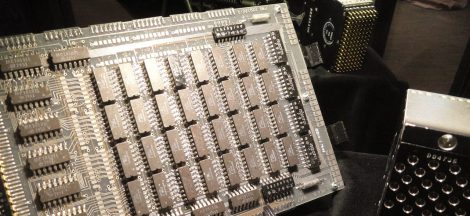
The machine is an NVIDIA DGX Spark, a compact desktop AI system built on the GB10 Grace Blackwell Superchip with 128 GB of unified memory shared by the CPU and GPU. We had already benchmarked two of them linked together; this series is about running one as a private AI server. On a normal PC the graphics card has its own memory. Here the 20-core Arm CPU, the Blackwell GPU, the operating system, databases and every model draw from one pool. That is why a 30-billion-parameter model fits on a desktop at all, and it is behind most of the problems in this series. The operating system reports roughly 120 GB of the 128 GB as usable, and that measured figure is the one we budget against throughout. It runs NVIDIA DGX OS, a Linux distribution, with Docker, and every service has its own container.
The workloads
By the end of the test program the server ran about 30 containers. The biggest group was n8n, a workflow-automation tool that works roughly like a self-hosted Zapier, running a few dozen test workflows. One pulled the fields out of a sample document request, drafted a reply for a person to review and filed it. Others loaded public reference datasets on a schedule, routed email from a synthetic mailbox, ran a document OCR form and fed the demo knowledge base.
A Telegram agent built on Hermes Agent, an open-source personal AI agent, ran on local models, and only lab test accounts could talk to it. IDE coding plugins and a browser chat (Open WebUI) all called one OpenAI-compatible endpoint, LiteLLM, with a key for every client.
For OCR we used an open 3-billion-parameter vision-language model that turns PDFs and images into Markdown with the tables intact. It loads on demand (about 7 GB), handles one job at a time with a 50-page cap and unloads after 10 minutes idle. Two knowledge bases used retrieval-augmented generation (RAG), where the model searches a document store first and answers from what it found, with sources. Both sat in a Qdrant vector database.
The last big workload was TradingAgents, an open-source multi-agent framework where analysts, researchers, a trader, a risk team and a portfolio manager reach a decision on one ticker. We added a web GUI and a ledger that scores how well each call agreed with later price moves (Part 8). It tests agent behaviour on public market data and is not financial advice. Whisper (speech-to-text), Langfuse (tracing) and a monitoring stack ran alongside.
The models
The primary model is a mixture-of-experts model: it uses only a few of its "expert" sub-networks for each token, so it answers at the speed of a much smaller model while all its weights still sit in memory. "4-bit" means quantised: each weight is stored in fewer bits, which shrinks a model to a third or a quarter of its size for a small loss of quality.
| Model | Size on disk | Role |
|---|---|---|
qwen3-coder (30B mixture-of-experts, 4-bit) | 18 GB | Primary model: code, agents, stock analysis |
gemma4 (26B) | 17 GB | Generalist, reads images, default for questions |
qwen3:0.6b | 0.5 GB | Tiny classifier for the smart router |
qwen2.5-coder:1.5b | 1 GB | IDE autocomplete |
| a small specialist model (7B) | 4.7 GB | Called by name only |
nemotron-3-nano (30B) | 24 GB | Only in its own sandboxed instance, opt-in per key |
Thinking about private AI for your organisation? We design, build and secure on-premises AI platforms for Australian organisations, with the guardrails this series describes built in from the start.
Challenges we hit
The planned inference server didn’t work
The day after deployment, the plan fell apart. The vLLM builds we could get crashed on the 4-bit mixture-of-experts kernels, and speculative decoding went with them. Ollama, the fallback, crashed on the GPU for exactly the two architectures we wanted, so the first deployment ran on the CPU at about 15 tokens per second. The models now run fully on the GPU through Ollama, but vLLM never recovered here.
The dead ends left a mess. One vLLM service was shut down as broken. Another, serving a 35B model, kept about 67 GB reserved until it was stopped, and for weeks it stayed first in the routing, so every non-coding request retried against a dead backend first. By the end, 179 GB of downloaded weights sat on disk unserved. We deleted nothing (Part 6 explains why).
A memory setting froze the machine
qwen3-coder ran with four parallel slots and a 64k context window, the amount of text a model can consider at once, measured in tokens of roughly three-quarters of a word. We had written that 64k into the model’s own settings file to stop prompts being cut short, and it quietly overrode the server-wide limit. In Ollama each slot gets the full window and reserves KV cache, the working memory for its context, so memory grows with context times slots, and the model’s footprint grew to about 33 GB, roughly 19 GB of weights plus roughly 14 GB of KV cache. With everything else on the same pool, the machine froze hard, with no kernel error, no NVIDIA driver (Xid) error and no OOM kill, and needed a power-cycle. There were five hard freezes in all (Part 3 is the full post-mortem). "Fits, zero margin" turned out to mean "freezes".
A hardware watchdog set to reboot after 60 seconds of a kernel hang didn’t fire, because something kept resetting it while everything else stalled, and we never proved what. We added an external heartbeat on a device that doesn’t share the server’s fate. Two days after the worst freeze, and again the next day, the server powered itself off, most likely from heat, though we didn’t prove it. After the restart, a two-second temperature recorder showed one ordinary stock-analysis test run taking the sensors from 48 °C to 95 °C in four minutes (Part 7).
The hand-built setup became unsafe to change
The first build had grown by hand: about 20 containers, more than a dozen models and four compose stacks in four places. A container was recreated from a floating :latest tag, silently upgrading the model server a few days before the first freeze, and a lab backup job had quietly stopped. There was no history and no rollback, and a client could reach a model three ways (Part 2).
We fixed it in five phases, the core in three days: stabilise, make a Git repository the single source of truth, write an operating contract, add observability, then close the side doors and give every client its own key. We removed nothing and only disabled things, recreated one container at a time and exposed nothing to the internet.
The result
For private, everyday work such as drafting, extraction, OCR and internal questions and answers, local was the right call. For public data, or work that needs the quality of the strongest frontier models, the cloud still fits.
Today only qwen3-coder and gemma4 stay loaded. Measured together at one request slot each, they take 37.8 GB (20.3 GB and 17.5 GB), against about 33 GB for qwen3-coder alone before the fix. Both run from tags with a 32,768-token context written in, although they support far more, and we keep at least 40 GB free. Everything else is cold: callable by name, loaded on demand, never picked automatically.
Everything except the gateway listens on the server itself (loopback), and the gateway and dashboards need authentication. No data leaves the server, and each call costs nothing. The Telegram agent answers in 3 to 7 seconds (Part 9). The operating rules fit on one page, such as "never change the box by hand", "no :latest tags" and "measure the memory budget, don’t derive it", and each exists because something went wrong once.
It still costs something. You become the operator. With one slot per model a second caller waits: over seven days of test traffic, a colliding caller waited a median of 18 seconds, and 90 per cent of waits were under 58 seconds. Quality isn’t at the level of the strongest cloud models, although a 30B local model is very capable for code, routing, extraction and summarising. The stock-analysis experiment, whose data is public anyway, may use free cloud models for its two "deep thinking" calls per run, with a local fallback. Free cloud tiers may log or train on prompts, which is why nothing else goes near them. The stack is young on new hardware, so pin every image and soak upgrades in a sandbox first. If we started again, we would use two servers, not one, and set up monitoring that someone reads.
Do it yourself: a base local AI server
What you need: a Linux server with a GPU with at least 24 GB of VRAM, or at least 32 GB of unified memory, for a 30B 4-bit model. Install the NVIDIA driver first; nvidia-smi (or your GPU vendor’s equivalent) should list the GPU. You also need a terminal with sudo and about an hour.
Install Ollama with its official script, which also creates a systemd service.
curl -fsSL https://ollama.com/install.sh | sh
systemctl status ollama
Check: the service shows
active (running)andollama --versionprints a version.Keep Ollama on loopback. By default it listens only on the machine itself. Don’t set
OLLAMA_HOSTto listen on all interfaces; in Part 2 a gateway becomes the only door.ss -ltn | grep 11434Check: the listening address is
127.0.0.1:11434, not a wildcard address for all interfaces. From a second machine,curl -m 5 http://<server>:11434is refused or times out.Set memory-safe defaults with a systemd override (
sudo systemctl edit ollama), thensudo systemctl restart ollama.[Service] Environment="OLLAMA_NUM_PARALLEL=1" Environment="OLLAMA_CONTEXT_LENGTH=32768" Environment="OLLAMA_MAX_LOADED_MODELS=2"Check:
systemctl show ollama --property=Environmentlists all three. Don’t skip the context setting: recent Ollama versions pick a default from the memory they see, up to 256k tokens on a large machine. Note thatsystemctl editreloads systemd; on a server already running GPU containers, read the GPU caveat in Part 3 first.Pull one model and give it an explicit context. A model can carry its own context setting that overrides the server-wide one; ours did, at 65,536 tokens, because we had put it there. Build a tag with the limit written in.
ollama pull qwen3-coder:30b
printf 'FROM qwen3-coder:30b\nPARAMETER num_ctx 32768\n' > Modelfile
ollama create qwen3-coder-32k -f Modelfile
Check:
ollama listshows both names at about 18–19 GB, andollama show qwen3-coder-32klistsnum_ctx 32768.Send a first request to the local API.
curl -s localhost:11434/api/generate \
  -d '{"model":"qwen3-coder-32k","prompt":"Say hello in five words.","stream":false}'
Check: you get JSON with a
responsefield. The first call is slower while the model loads.Measure memory with the model loaded. Run
free -hbefore and after the first request, thenollama ps. Check:ollama psshows100% GPUunder PROCESSOR, a context of 32768 and a SIZE close to 20 GB. (The CONTEXT column is in recent Ollama versions; on older ones usecurl -s localhost:11434/api/ps.) If it says CPU, the model isn’t on the GPU. Write the measured figure down; it is your real budget, not the file size.Write the data rule down in a short operating-rules file kept in Git, starting with "data never leaves the server" and "every model call goes through the gateway". Add your memory margin. Check:
git logshows the file, and each later change to it is a reviewed commit.
Key takeaways
- A compact desktop AI system like the DGX Spark can carry a small team’s everyday AI work, as long as you design around its shared memory rather than the model card.
- "Data never leaves the server" works when the gateway’s configuration enforces it, not people’s good intentions.
- A plan with zero memory margin is a plan to freeze. Measure what each model reserves.
- Local AI swaps a per-token bill for an operations job. Budget for the operating work as well as the hardware.
- Turn every problem into a written rule that a check enforces, such as "no
:latesttags" refused at commit.
Planning private AI?
Catharsis Cyber Security is a Sydney cyber security company. We design, build and secure private AI platforms like the one in this lab, and help you decide where local or cloud AI fits.
Keep reading the series