Our work

Our work

Case studies from our security and cloud engagements, the websites we designed and built for clients in 2026, and our cyber security education work. Our security clients are covered by non-disclosure agreements, so those case studies don't name them. The websites are shown with their owners' permission.

01Security & cloud

Security and cloud case studies

Security operations, governance and cloud security engagements.

Why there are no client names: our security work is covered by non-disclosure agreements, so we don't disclose who our clients are. Each case study describes the sector, the problem and the results instead.

  • Technology and engineering · client under NDA

    Security operations and governance program

    A repeatable security operations program with clear governance for an organisation with distributed engineering teams, built within a tight budget.

    The challenge

    The organisation was shrinking its cloud footprint and bringing distributed engineering teams closer together. Along the way, security controls drifted apart. Fast deployments, untracked assets and unmanaged devices left gaps in visibility, patching had no clear owner and Essential Eight maturity varied between business units. Internal audits flagged weaknesses in governance, change control and configuration management.

    What we did

    • Set up central governance with risk-based change management, an enterprise asset inventory, a living risk register and a remediation model with agreed service levels.
    • Helped implement and integrate a central security monitoring (SIEM) platform and a central identity and access management solution.
    • Wrote runbooks for infrastructure-as-code deployments, patching, incident response, access reviews, configuration hardening and vulnerability remediation, so the work is done the same way every time.
    • Built regular operating rhythms: patch compliance rounds, continuous threat monitoring and hunting, threat-intelligence briefings, cloud posture and maturity reviews, and a regular risk evaluation.
    • Built red-team testing into the development lifecycle, plus purple-team exercises to tune detection rules and find blind spots.
    • Ran workshops, leadership briefings and training for engineering teams on secure development, identity hygiene and configuration baselines.
  • Technology and software · client under NDA

    Cloud security and Zero Trust transformation

    A rebuilt, multi-account AWS environment moving to a Zero Trust model, tested by a red-team simulation.

    The challenge

    The organisation had expanded quickly across multiple AWS accounts running customer-facing apps, APIs and analytics. An internal audit found high-risk issues: over-permissive access roles, incomplete audit logging, weakly configured storage, untagged servers, unmanaged firewall rules and poor separation between development and production. Secrets in the deployment pipeline were poorly managed and nobody clearly owned the cloud assets.

    What we did

    • Re-architected the environment as a secure multi-account landing zone, with identity federation, mandatory MFA, organisation-wide guardrails and network segmentation.
    • Rebuilt identity and access from the ground up on least privilege, with permission boundaries, just-in-time elevation and automated entitlement checks. Wildcard permissions, unused roles and long-lived credentials were removed.
    • Designed a Zero Trust model with micro-segmentation, continuous authentication checks, device trust and tight controls on traffic between workloads.
    • Hardened the platform: central audit logging, encryption by default, key management with enforced rotation, benchmark-aligned configuration and automated fixes for drift.
    • Ran a controlled red-team simulation of realistic attacks, including privilege-escalation chains, server-side request forgery, pipeline weaknesses and lateral movement between accounts. Then built detections for the behaviours it exposed.
  • Australian small business · client under NDA

    Business email compromise investigation

    An investigation and clean-up after an attacker took over a Microsoft 365 mailbox, hid a forwarding rule and emailed everyone in the user's contacts.

    The challenge

    An attacker gained access to a staff member's Microsoft 365 mailbox. They quietly added a forwarding rule that sent copies of the user's email to an outside address, then used the mailbox to send emails to everyone in the user's contacts. Multi-factor authentication was not enforced on the tenant, so a stolen password was all the attacker needed. The business needed to know how it happened, how far it had spread and how to stop it happening again.

    What we did

    • Contained the account: removed the attacker's forwarding rule, reset the password and signed the account out of every session.
    • Traced the email chains and mailbox logs to build a timeline, which pointed to a phishing email from an external sender as the likely starting point.
    • Identified the two likely ways the password was obtained: credentials exposed in a third-party data breach, or a convincing phishing page that captured them.
    • Reviewed sign-in audit logs across the whole tenant, not just the affected mailbox.
    • Worked with a linked third-party file-sharing service to recover access to a connected account protected by its own two-factor authentication.
    • Delivered a post-incident report with findings, evidence and prioritised next steps.

02Development

Our recent work

Client websites from our development team. Filter by sector to find work like yours.

Filter by sector
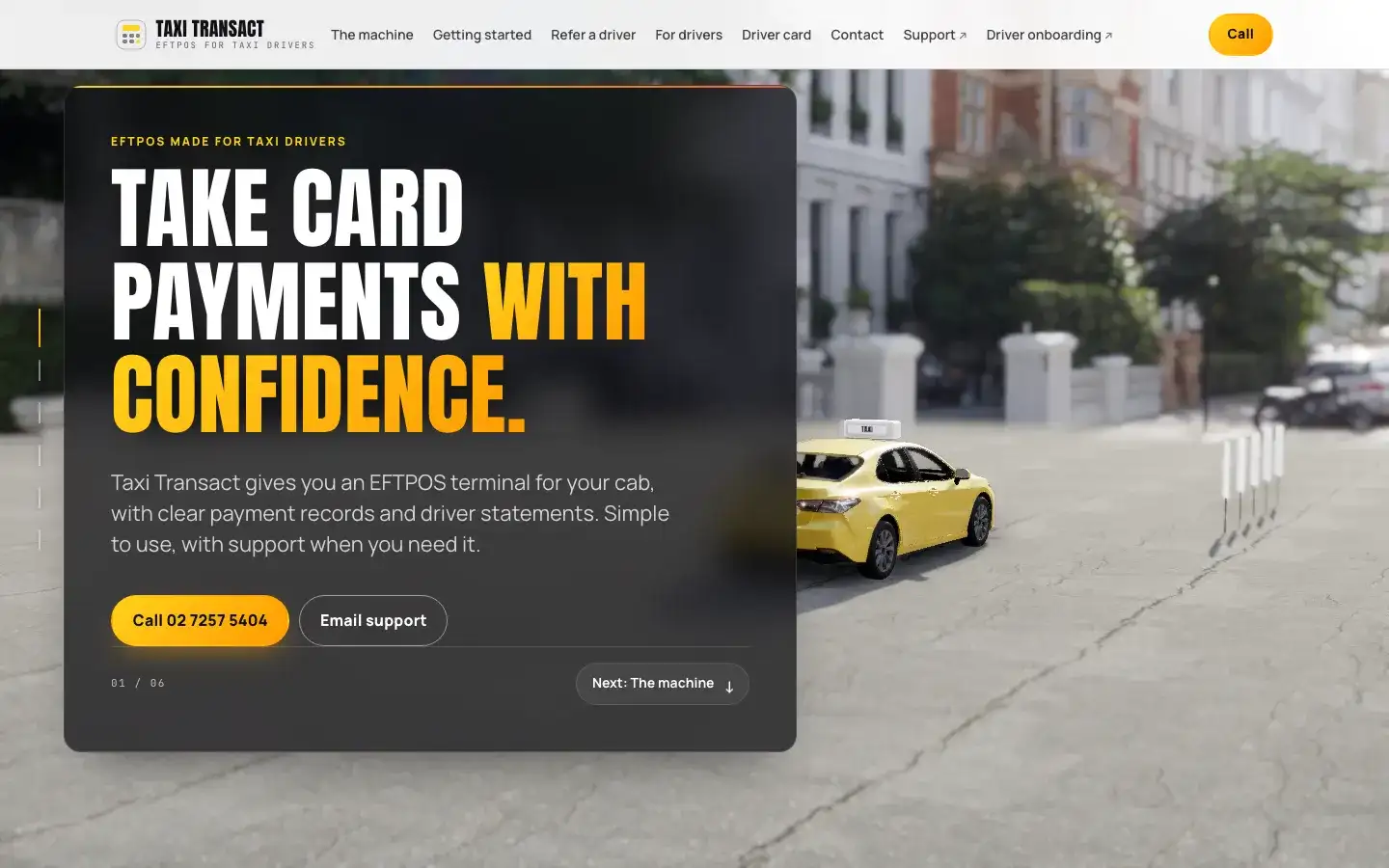
  • Screenshot of the Taxi Transact website home page

    Transport

    EFTPOS for taxi drivers website

    Taxi Transact

    Website for an in-cab EFTPOS terminal service for taxi drivers. It shows how the terminal works with an interactive demo, walks drivers through onboarding and the referral offer, and lists support contacts.

    What we did
    • Website Design & Development
    Visit the Taxi Transact website (external site, opens in a new tab)
  • Screenshot of the Anil Traders website home page

    Manufacturing

    Electrical equipment manufacturer website

    Anil Traders

    Website for a manufacturer of HT and LT transmission and distribution equipment in Aligarh, India, established in 1967. It presents the product range, from air break switches to substation isolators, and the works.

    What we did
    • Website Design & Development
    Visit the Anil Traders website (external site, opens in a new tab)
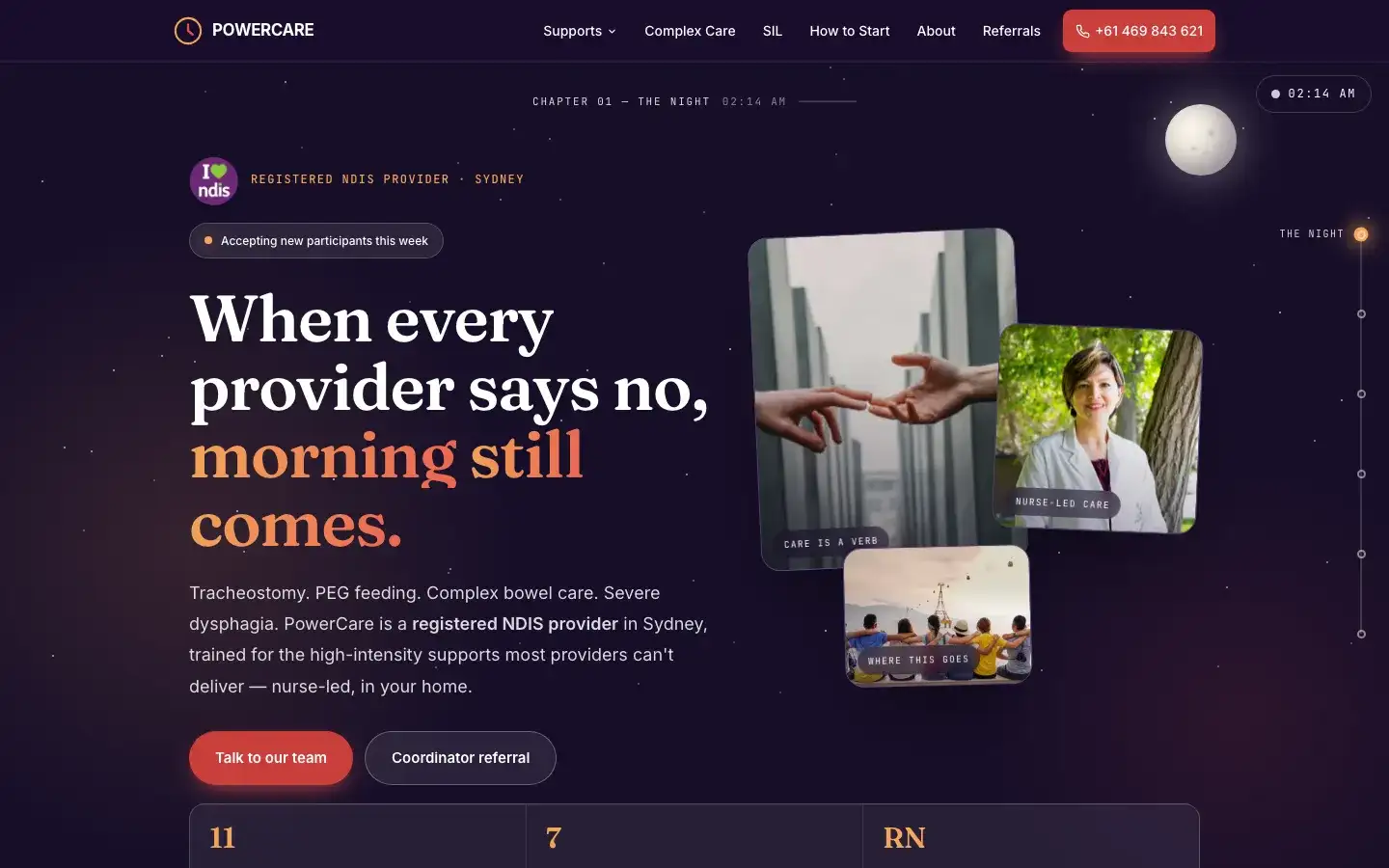
  • Screenshot of the PowerCare website home page

    Health and disability support

    NDIS high-intensity care website

    PowerCare

    Website for a registered NDIS provider in Sydney. It explains the nurse-led, high-intensity supports on offer, such as tracheostomy and PEG feeding care, and lets participants and support coordinators get in touch or refer.

    What we did
    • Website Design & Development
    Stack
    Astro
    Visit the PowerCare website (external site, opens in a new tab)
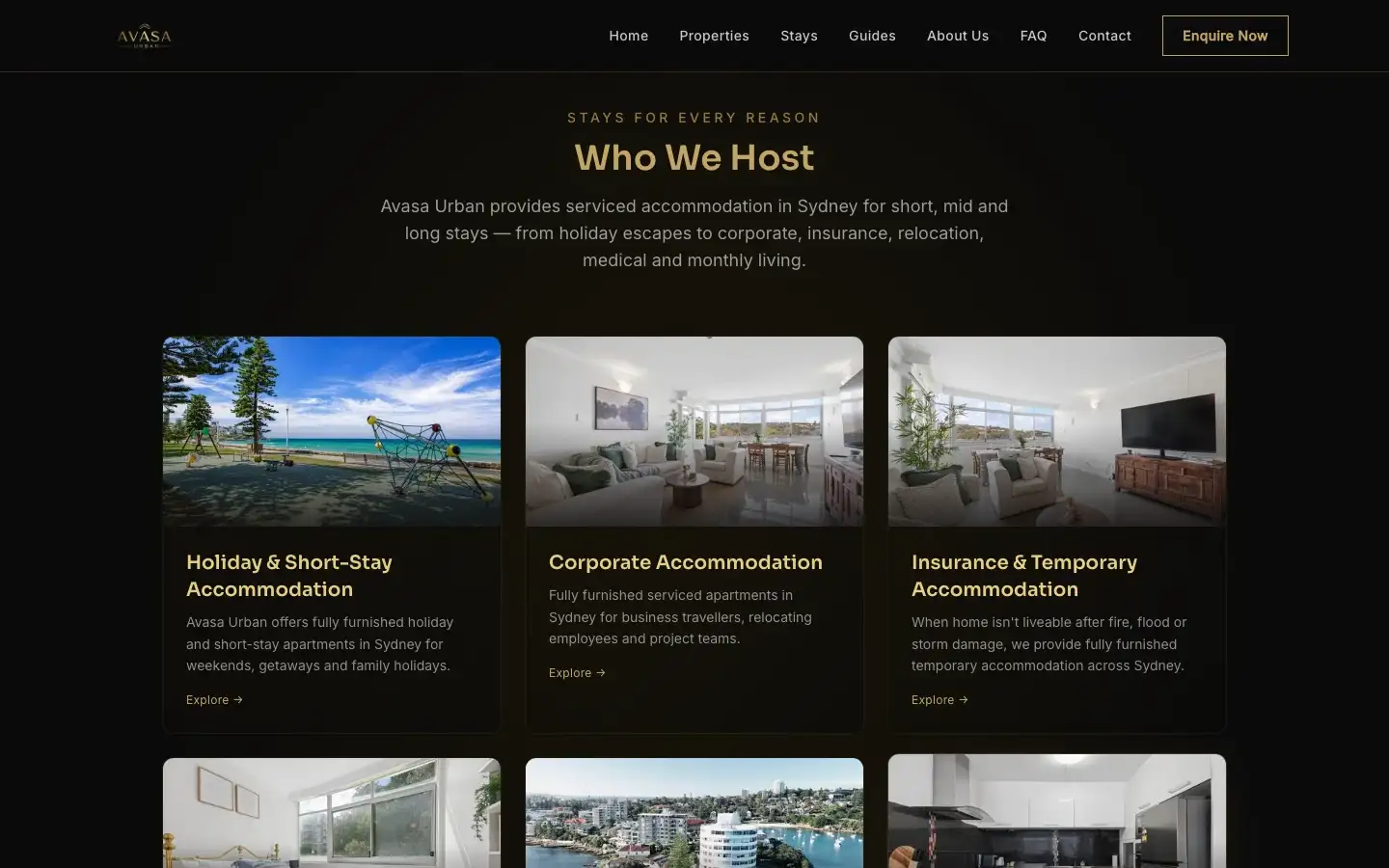
  • Screenshot of the Avasa Urban website home page

    Accommodation

    Serviced apartments website

    Avasa Urban

    Website for furnished serviced apartments in Sydney for short, mid and long stays. It showcases the properties and what each stay includes, with local area guides, FAQs and ways to enquire or book.

    What we did
    • Website Design & Development
    Stack
    Astro
    Visit the Avasa Urban website (external site, opens in a new tab)

03Education & training

Cyber security education

Hands-on security labs and course delivery for postgraduate students. These clients are also covered by non-disclosure agreements.

  • Higher education · client under NDA

    Computer and network security lab program

    A redesigned suite of hands-on labs and tutorials for a postgraduate computer and network security course at an Australian university.

    The challenge

    The course's practical materials were out of date, light on modern cryptography and offered little hands-on experience of real attacks and defences. As enrolments grew, tutorials were delivered inconsistently and students struggled to meet learning outcomes such as evaluating cryptosystems and analysing protocol failures.

    What we did

    • Led the redesign of every lab and tutorial, working with academic staff and specialists in cryptography and network security.
    • Built cryptography labs on symmetric encryption, public-key operations, digital signatures and key exchange, including how weak ciphers break and how cryptography is misused in practice.
    • Created network security labs on packet analysis, spoofing and poisoning attacks, TLS negotiation, firewall and NAT rules, and sandboxed malware behaviour.
    • Added labs on browser security, secure protocol design and a simulated electronic-voting system.
    • Structured the learning from basics to advanced work, and refreshed slides, rubrics, quizzes and tutor guides, so every class got the same quality.
  • Higher education · client under NDA

    Applied cyber security course delivery

    A consistent, scalable way to deliver a technically demanding applied cyber security course to large postgraduate cohorts.

    The challenge

    The course reached large, diverse cohorts each year, with several tutors and labs that depended on reliable virtual machines, vulnerable web-app targets and simulated corporate networks. The university needed delivery that stayed consistent across classes, semesters and teaching staff as enrolments grew.

    What we did

    • Coordinated tutorial streams across multiple classes and standardised how tutors ran lab walkthroughs, gave help and applied marking expectations.
    • Worked with course coordinators on assessment sequencing and lab instructions, so students moved logically from offensive security basics to defensive configuration, incident triage, log analysis and secure design.
    • Kept the lab environments running at peak load, fixing virtual machine, network and configuration problems across classes at once.
    • Wrote guidance notes, Q&A resources and cheat sheets for hundreds of students, and coordinated one-to-one support at peak assessment times.
    • Brought student feedback together each semester to inform course and lab updates.

04Example scenarios

Example scenarios: how we would approach it

Illustrative situations in law, accounting, construction, healthcare and other sectors, and how we would work through them.

These are illustrative examples, not client case studies. The organisations described are not real clients. Each example shows a typical situation, how we would approach it and what you would receive.

  • Example scenario · Architecture

    Example scenario: Taking over IT when the 'IT person' leaves

    The situation

    A 25-person architecture practice has relied on one staff member who 'looked after the computers'. They have just resigned. Nobody else knows the admin passwords, which laptops are covered by warranty, or whether the file server backups actually work. The practice needs someone to take over before something breaks.

    How we would approach it

    1. Start with discovery: recover admin access, list every user, device, licence and line-of-business application, and map the network and file storage.
    2. Change every shared and admin password, move admin access to named accounts with multi-factor authentication, and remove accounts for people who have left.
    3. Roll out the security baseline to every device: endpoint detection and response, patching, disk encryption and monitoring.
    4. Test a real restore from the existing backups before relying on them, and fix the gaps.
    5. Set up the helpdesk so staff know how to ask for help, and agree service levels in writing.

    What you receive

    • Written documentation of the environment, including where the admin credentials are held
    • A hardened, monitored set of devices with the security baseline in place
    • A tested backup and restore, with the result recorded
    • A helpdesk with a written service level agreement
    • A prioritised list of what to replace or fix next, with a written quote for each
    About Managed IT Support & Helpdesk
  • Example scenario · Accounting

    Example scenario: Protecting client tax and financial data after an email compromise

    The situation

    Consider a 40-person accounting firm still running email on an old hosted service. A partner's mailbox is compromised and a client is sent fake bank details. The mailbox holds tax file numbers, payslips and financial statements for hundreds of clients. The firm wants to move to Microsoft 365, set up securely this time, and its insurer wants to see what has changed.

    How we would approach it

    1. Design the tenant first: named admin roles kept separate from everyday accounts, multi-factor authentication for every user and conditional access policies.
    2. Migrate mailboxes, calendars and shared files in planned stages, so staff keep working through the move.
    3. Block automatic forwarding to outside addresses, turn on mailbox auditing and set up alerts for risky sign-ins.
    4. Publish SPF, DKIM and DMARC records so others can't easily impersonate the firm's domain.
    5. Help the firm assess whether the compromise is a notifiable data breach, and stop clients sending tax file numbers and statements by email by moving them to a secure document portal.
    6. Train staff to spot payment-change scams, and agree a call-back rule for any change to bank details.

    What you receive

    • A secured Microsoft 365 tenant, with the configuration documented
    • Every mailbox migrated, with multi-factor authentication enforced
    • Email authentication records published and monitored
    • A summary of the controls in place for the insurer
    • A short staff guide on reporting suspicious emails
    About Microsoft 365 & Google Workspace
  • Example scenario · Not-for-profit

    Example scenario: ASD Essentials readiness for a funding agreement

    The situation

    A community services not-for-profit is renewing a government funding agreement. The new agreement asks how the organisation manages cyber risk against ASD's guidance, and the board wants an honest answer rather than a tick-box one. The organisation has a small internal team and a tight budget.

    How we would approach it

    1. Baseline current controls against ASD's current maturity model, using evidence from the systems themselves, not just a questionnaire.
    2. Explain each gap in plain terms: what it means, how likely it is to be exploited and what it costs to fix.
    3. Prioritise fixes by risk reduction for the money, starting with multi-factor authentication, patching and admin access.
    4. Show how the work lines up with ASD Essentials as ASD publishes transition guidance.
    5. Make the fixes with the internal team where that helps, rather than just reporting them.

    What you receive

    • A baseline report against the current maturity model, with the evidence behind each finding
    • A prioritised, costed roadmap
    • A one-page summary for the board and the funding body
    • An evidence register to keep up to date as controls improve
    About ASD Essentials
  • Example scenario · Logistics

    Example scenario: Stopping supplier invoice fraud by email

    The situation

    A logistics company keeps receiving emails that look like they come from its regular suppliers, asking accounts to update bank details for upcoming invoices. One nearly got paid. Some of the emails even appear to come from the company's own domain.

    How we would approach it

    1. Review how email reaches the company and why the spoofed messages got through the current filtering.
    2. Set up SPF, DKIM and DMARC, monitor the reports, then move the domain to enforcement so others can't send as the company.
    3. Turn on impersonation and lookalike-domain protection for executives, accounts staff and key suppliers.
    4. Give staff a one-click way to report suspicious emails, with reported messages reviewed and removed from other mailboxes.
    5. Help the business set a verification rule for any bank detail change, confirmed by phone on a known number.

    What you receive

    • Email authentication published and enforced for the company's domains
    • Filtering tuned for impersonation and lookalike domains
    • A reporting button and a review process for suspicious emails
    • A written bank-detail change procedure for the accounts team
    About Email Security
  • Example scenario · Professional services

    Example scenario: Getting control of staff AI use

    The situation

    A 60-person professional services firm finds that staff are already pasting client documents into free public AI tools to draft emails and summaries. Leadership wants the productivity benefits, but not the confidentiality risk, and a major client has started asking about the firm's AI policy in its security questionnaire.

    How we would approach it

    1. Find out what is actually in use: which AI tools, by which teams, and with what kinds of data.
    2. Agree with leadership which uses are allowed, which need approval and which are not permitted, based on how sensitive the data is.
    3. Write a practical AI use policy that staff can follow, and choose approved tools with appropriate data protections.
    4. Configure the approved tools securely, including who can access what, and check permissions before switching on AI features that can see company files.
    5. Brief staff on the policy with real examples from their own work.

    What you receive

    • An inventory of AI tools in use and the data involved
    • A plain-English AI use policy and a list of approved tools
    • Secure configuration of the approved tools
    • Answers the firm can reuse in client security questionnaires
    • Staff briefing materials
    About AI Security & Governance
  • Example scenario · Software

    Example scenario: A penetration test before an enterprise contract

    The situation

    A growing software company is close to signing its first large enterprise customer. The customer's security team wants an independent penetration test of the web application and its API before the contract is signed, and a report they can review.

    How we would approach it

    1. Agree the scope in writing: the application, the API, the user roles to test and the test environment, with rules of engagement signed off by both sides.
    2. Test manually, not just with an automated scanner, focusing on access control between customers and roles, authentication, business logic and the API.
    3. Report each finding with its risk, evidence, how to reproduce it and how to fix it, with a summary written for non-technical readers.
    4. Walk the development team through the findings and answer questions as they fix them.
    5. Retest the fixed findings and confirm which are closed.

    What you receive

    • A written scope and rules of engagement
    • A full technical report and an executive summary
    • A retest of fixed findings, with the results recorded
    • A report suitable to share with the customer's security team
    About Penetration Testing
  • Example scenario · Legal

    Example scenario: Protecting client identity documents and settlement funds

    The situation

    A 15-person law firm with a busy conveyancing practice receives an email, apparently from a client, asking for settlement funds to go to a new account. The paralegal spots it, but the near miss worries the partners. Matter files, including copies of clients' passports and driver licences collected for identity checks, sit in shared folders every staff member can open. Two lawyers work from home on personal laptops.

    How we would approach it

    1. Enforce multi-factor authentication and conditional access, so a stolen password alone can't open a mailbox or the document system.
    2. Protect the firm's domain with SPF, DKIM and DMARC, and turn on impersonation protection for partners and the trust account team.
    3. Help the firm set a written rule that trust account and settlement details are confirmed by phone on a known number, never by email alone.
    4. Restrict matter files so staff only see the matters they work on, keep identity documents in a protected location, and remove copies the firm no longer needs.
    5. Bring the home laptops under management or replace them with managed devices.

    What you receive

    • Secured email and sign-in for every staff member
    • Email authentication published and enforced for the firm's domain
    • A written payment verification procedure for trust account transactions
    • Matter-based access to client files, with identity documents stored securely
    • Managed, monitored devices for staff working from home
    About Managed Security
  • Example scenario · Construction

    Example scenario: Protecting worker and subcontractor records across building sites

    The situation

    A builder with about 80 staff runs a head office and several building sites. Site managers share tablets and laptops, and drawings go to subcontractors through open links that never expire. The company also holds workers' and subcontractors' licences, induction records and bank details in spreadsheets on a shared drive. Staff come and go with each project, and the directors worry a ransomware attack could stop every site and expose that personal information.

    How we would approach it

    1. Bring every laptop, tablet and phone under central management, so a lost site device can be locked or wiped remotely.
    2. Replace open sharing links with controlled external sharing: named subcontractors, sensible expiry dates and access removed when a project closes.
    3. Move worker and subcontractor records out of shared spreadsheets into a system with role-based access, and limit who can see bank details.
    4. Make onboarding and offboarding part of each project, so accounts are created and removed on time.
    5. Back up project files and drawings separately from the main storage, and test that they can be restored.

    What you receive

    • Managed, encrypted devices across head office and sites
    • Worker and subcontractor records with role-based access
    • Controlled subcontractor access to drawings and documents
    • A project onboarding and offboarding checklist
    • Protected, tested backups of project data
    About Managed IT Support & Helpdesk
  • Example scenario · Healthcare

    Example scenario: Protecting patient information at a health practice

    The situation

    An allied health group runs three clinics using a cloud practice-management system and email. Reception staff share one login on the front-desk computers, old staff accounts are still active, and nobody is sure what to do if patient information is exposed. The owners know health information carries strict obligations under the Privacy Act, including the Notifiable Data Breaches scheme.

    How we would approach it

    1. Give every staff member their own login with multi-factor authentication, and remove accounts for people who have left.
    2. Lock down the front-desk computers: automatic screen locks, no local admin rights and endpoint protection.
    3. Review who can see what in the practice-management system and email, and limit access to what each role needs.
    4. Write an incident response plan that covers how a suspected data breach is assessed and who is notified, with legal advice where needed.
    5. Train staff on phishing and on handling patient information securely.

    What you receive

    • Individual, MFA-protected accounts for every staff member
    • Hardened, monitored front-desk and clinical computers
    • Role-based access to patient systems
    • A data breach response plan the practice can follow
    • Staff training on phishing and patient privacy
    About Managed Security

Talk to our team

Want to talk about your situation?

Tell us what you need, whether that is security, IT or a website, and we will suggest where to start. Enquiries usually get a reply within 3 business days.