
Free subnet calculator and a subnet mask cheat sheet for every prefix from /8 to /32. Jump straight in, or scroll down for how it all works.
Subnet calculator
Five tools in one: work out any subnet, split a network into smaller ones, size a subnet for a number of devices, turn an IP range into CIDR blocks, or work out an IPv6 prefix. Results update as you type.
| Network (CIDR) | |
|---|---|
| Network address | |
| Broadcast address | |
| Usable host range | |
| Usable hosts | |
| Total addresses | |
| Subnet mask | |
| Wildcard mask | |
| Address type | |
| Class (historical) | |
| Previous subnet | |
| Next subnet | |
| Reverse DNS zone | |
| IP in binary | |
| Mask in binary |
Blue bits are the network part; orange bits are the host part.
| Subnet | Usable range | Broadcast | Hosts |
|---|
| Addresses to plan for | |
|---|---|
| Recommended prefix | |
| Subnet mask | |
| Usable hosts | |
| Spare addresses | |
| Note |
The smallest set of CIDR blocks that covers exactly this range. Handy for firewall rules and access lists.
| Network (CIDR) | |
|---|---|
| Address, compressed | |
| Address, expanded | |
| Network prefix (expanded) | |
| First address | |
| Last address | |
| Number of addresses | |
| Number of /64 subnets | |
| Previous prefix | |
| Next prefix | |
| Address type | |
| Reverse DNS zone (ip6.arpa) | |
| Note |
IPv6 has no broadcast address, so every address in the prefix can be used. The first address is also the Subnet-Router anycast address (RFC 4291), so most networks start hosts at ::1.
Everything is calculated in your browser; nothing you type is sent anywhere. Share a result by copying the page address (it ends with the network, for example #10.0.0.0/22). IPv6 links work too, for example #2001:db8::/48.
In this post
Subnet mask reference table (/8 to /32)
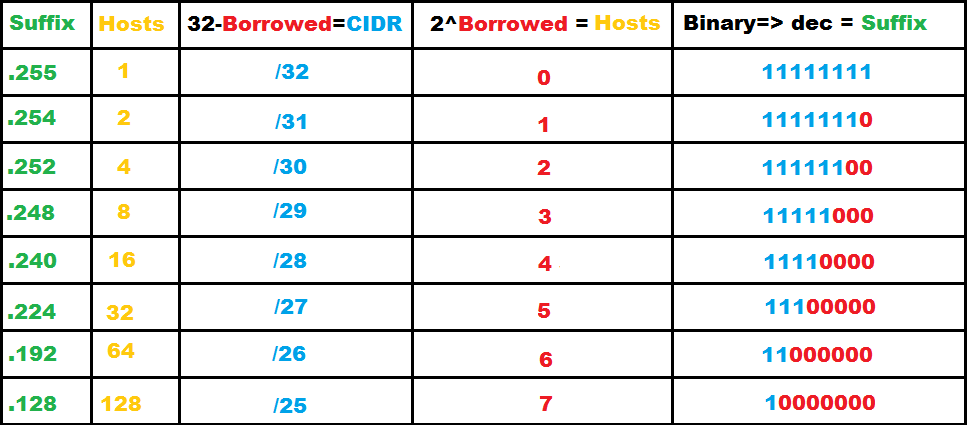
Usable hosts are the total addresses minus two, because the first address names the network and the last is the broadcast. /31 and /32 are the exceptions (see below). The last column shows how many /24 networks (the familiar 255.255.255.0) each size equals.
| CIDR | Subnet mask | Wildcard mask | Total addresses | Usable hosts | Number of /24s |
|---|---|---|---|---|---|
| /32 | 255.255.255.255 | 0.0.0.0 | 1 | 1 | 1/256 |
| /31 | 255.255.255.254 | 0.0.0.1 | 2 | 2 | 1/128 |
| /30 | 255.255.255.252 | 0.0.0.3 | 4 | 2 | 1/64 |
| /29 | 255.255.255.248 | 0.0.0.7 | 8 | 6 | 1/32 |
| /28 | 255.255.255.240 | 0.0.0.15 | 16 | 14 | 1/16 |
| /27 | 255.255.255.224 | 0.0.0.31 | 32 | 30 | 1/8 |
| /26 | 255.255.255.192 | 0.0.0.63 | 64 | 62 | 1/4 |
| /25 | 255.255.255.128 | 0.0.0.127 | 128 | 126 | 1/2 |
| /24 | 255.255.255.0 | 0.0.0.255 | 256 | 254 | 1 |
| /23 | 255.255.254.0 | 0.0.1.255 | 512 | 510 | 2 |
| /22 | 255.255.252.0 | 0.0.3.255 | 1,024 | 1,022 | 4 |
| /21 | 255.255.248.0 | 0.0.7.255 | 2,048 | 2,046 | 8 |
| /20 | 255.255.240.0 | 0.0.15.255 | 4,096 | 4,094 | 16 |
| /19 | 255.255.224.0 | 0.0.31.255 | 8,192 | 8,190 | 32 |
| /18 | 255.255.192.0 | 0.0.63.255 | 16,384 | 16,382 | 64 |
| /17 | 255.255.128.0 | 0.0.127.255 | 32,768 | 32,766 | 128 |
| /16 | 255.255.0.0 | 0.0.255.255 | 65,536 | 65,534 | 256 |
| /15 | 255.254.0.0 | 0.1.255.255 | 131,072 | 131,070 | 512 |
| /14 | 255.252.0.0 | 0.3.255.255 | 262,144 | 262,142 | 1,024 |
| /13 | 255.248.0.0 | 0.7.255.255 | 524,288 | 524,286 | 2,048 |
| /12 | 255.240.0.0 | 0.15.255.255 | 1,048,576 | 1,048,574 | 4,096 |
| /11 | 255.224.0.0 | 0.31.255.255 | 2,097,152 | 2,097,150 | 8,192 |
| /10 | 255.192.0.0 | 0.63.255.255 | 4,194,304 | 4,194,302 | 16,384 |
| /9 | 255.128.0.0 | 0.127.255.255 | 8,388,608 | 8,388,606 | 32,768 |
| /8 | 255.0.0.0 | 0.255.255.255 | 16,777,216 | 16,777,214 | 65,536 |
How to read a subnet mask
An IPv4 address is 32 bits, written as four numbers from 0 to 255. A subnet mask splits those 32 bits into two parts: the network part, which every device on the same subnet shares, and the host part, which is unique to each device.
In binary, a mask is always a run of 1s followed by 0s. The 1s mark the network bits. CIDR notation simply counts the 1s: 255.255.255.0 is twenty-four 1s, so it is written /24. That leaves 8 host bits, which is 2⁸ = 256 addresses.
255.255.255.0   = 11111111.11111111.11111111.00000000   = /24
255.255.255.192 = 11111111.11111111.11111111.11000000   = /26
255.255.240.0   = 11111111.11111111.11110000.00000000   = /20
Each extra network bit halves the subnet: a /25 is half a /24, a /26 is a quarter, and so on. Each bit you take away doubles it: a /23 is two /24s side by side.
Worked example: 192.168.10.25/26
- Block size: a /26 has 32 − 26 = 6 host bits, so each subnet holds 2⁶ = 64 addresses.
- Network address: subnets of 64 start at .0, .64, .128 and .192. The address .25 falls in the first block, so the network is
192.168.10.0. - Broadcast: the last address in the block,
192.168.10.63. - Usable hosts:
192.168.10.1to192.168.10.62, which is 62 devices. - Next subnet:
192.168.10.64/26.
A shortcut that works for any prefix in the last octet: block size = 256 minus the last number of the mask. For 255.255.255.192 that is 256 − 192 = 64.
Planning a new network or untangling an old one? We design, build and look after secure business networks in Sydney: VLANs and segmentation, firewalls, Wi-Fi and remote access.
Which subnet size should you use?
Size each subnet for the devices it will hold in a few years, not today, and keep broadcast domains modest. These are sensible starting points for a small or mid-sized business:
| Use | Typical size | Why |
|---|---|---|
| Link between two routers or firewalls | /31 (or /30) | Only two addresses are needed |
| Network devices and management | /27 to /26 | Few devices, easy to firewall tightly |
| Servers | /26 to /24 | Room to grow without renumbering |
| Staff computers (one office) | /24 | 254 hosts covers most single sites |
| Guest Wi-Fi | /24 to /23 | Phones and laptops come and go; leases pile up |
| Cameras, printers and other devices (IoT) | /25 to /24 | Keep them apart from staff and servers |
| A larger site, one flat network | /22 or smaller | Bigger than this, split it into VLANs |
A common pattern is to give each site a /16 from the private 10.0.0.0/8 range and carve it into /24s per purpose. Plan the scheme once and write it down; renumbering later is far more work than planning now.
Private and special IPv4 ranges
| Range | What it is for |
|---|---|
| 10.0.0.0/8 | Private addresses (RFC 1918): 16.7 million addresses, ideal for multi-site businesses |
| 172.16.0.0/12 | Private addresses (RFC 1918): 172.16.0.0 to 172.31.255.255 |
| 192.168.0.0/16 | Private addresses (RFC 1918): common in homes and small offices |
| 100.64.0.0/10 | Shared address space for carrier-grade NAT (RFC 6598); not for your LAN |
| 127.0.0.0/8 | Loopback: the device itself |
| 169.254.0.0/16 | Link-local (APIPA): a device that couldn't get an address from DHCP |
| 192.0.2.0/24, 198.51.100.0/24, 203.0.113.0/24 | Reserved for documentation and examples (RFC 5737) |
| 224.0.0.0/4 | Multicast |
| 240.0.0.0/4 | Reserved |
If two sites or a VPN partner use the same private range, they can't route to each other cleanly. Avoid 192.168.0.0/24 and 192.168.1.0/24 for business networks: they clash with almost every home router your remote staff connect from.
/31 and /32: the exceptions
A /32 is a single address. It is used for host routes, loopback interfaces on routers, and firewall rules that match one machine.
A /31 has two addresses and no broadcast. RFC 3021 allows it on point-to-point links, so both addresses are usable. It saves half the addresses of the older /30 habit, and most modern routers and firewalls support it.
Wildcard masks
A wildcard mask is the subnet mask inverted: every 1 becomes 0 and every 0 becomes 1. 255.255.255.0 becomes 0.0.0.255. Some router access lists and routing protocols (for example OSPF network statements) use wildcards instead of masks. A 0 bit means "must match" and a 1 bit means "any value". The reference table and the calculator above show the wildcard for every size.
IPv6 in one minute
- Every IPv6 LAN segment should be a /64. Features such as SLAAC (automatic addressing) depend on it, so don't make LAN subnets smaller.
- A site usually receives a /56 or /48 from its provider, which gives 256 or 65,536 /64 subnets.
- There is no broadcast in IPv6, and no "minus two" for usable hosts.
- Plan IPv6 with the same segmentation you use for IPv4: one /64 per VLAN, same firewall rules between them.
- Use the IPv6 tab in the calculator above to check any prefix.
Subnetting as a security control
Subnets are not just about addresses. They are one of the cheapest and most effective security controls a business has. When staff laptops, servers, guest Wi-Fi, cameras and printers all share one flat network, a single compromised device can reach everything. Separate them into their own subnets or VLANs, and put a firewall between them, and an attacker has to break through again at every step.
- Put servers, staff devices, guests, cameras and IoT, and management interfaces in separate subnets.
- Allow only the traffic each group needs between subnets, and block the rest by default.
- Keep management interfaces (switches, firewalls, hypervisors) on a subnet only administrators can reach.
- Put guest Wi-Fi on its own subnet with internet access only.
- Log traffic between subnets, so unusual connections stand out.
This is also the kind of control frameworks such as ASD Essentials and ISO/IEC 27001 expect to see: networks divided by purpose and risk, with documented rules between them.
Want to know what an attacker can see from the internet? An external network penetration test checks your public IP addresses, open services and firewall rules the way an attacker would.
Common subnetting mistakes
- Using the network or broadcast address as a host address.
- Overlapping subnets across sites, so VPN routes conflict.
- One huge flat /16 for everything, which makes broadcast storms and lateral movement easy.
- Picking 192.168.0.0/24 or 192.168.1.0/24, which clash with home networks over VPN.
- Forgetting the gateway and DHCP reservations when counting how many hosts fit.
- Not writing the plan down, so the next person guesses.
FAQ
How many usable hosts are in a /24?
254. A /24 has 256 addresses; the first is the network address and the last is the broadcast.
What is the difference between a subnet mask and CIDR?
They describe the same thing. 255.255.255.0 is the mask written as four numbers; /24 is the same mask written as the count of network bits.
What subnet mask is 255.255.255.0?
It is a /24: 256 addresses, 254 usable hosts, wildcard 0.0.0.255.
Why do we subtract two from the host count?
In a normal IPv4 subnet the first address identifies the network and the last is the broadcast address, so neither can be assigned to a device. /31 and /32 are the exceptions.
Is a /31 safe to use?
Yes, on point-to-point links between two devices that support RFC 3021, which most modern routers and firewalls do. Don't use it for a LAN.
What size subnet do I need for 100 devices?
A /25 gives 126 usable hosts, but a /24 (254 hosts) leaves room to grow and is easier to read. Use the calculator above to check any size.
Need help with your network?
Catharsis Cyber Security is a Sydney cyber security company. We design and secure business networks, test them the way an attacker would, and can look after them for you as part of managed IT.